
How to Make the Bandit (YB & Juice WRLD) AI Rap Duo Video Trend
Step-by-step guide to creating the viral 7-shot Bandit YB & Juice WRLD AI rap duo video from two photos—with sharp face likeness, accurate lip-sync, and original audio.
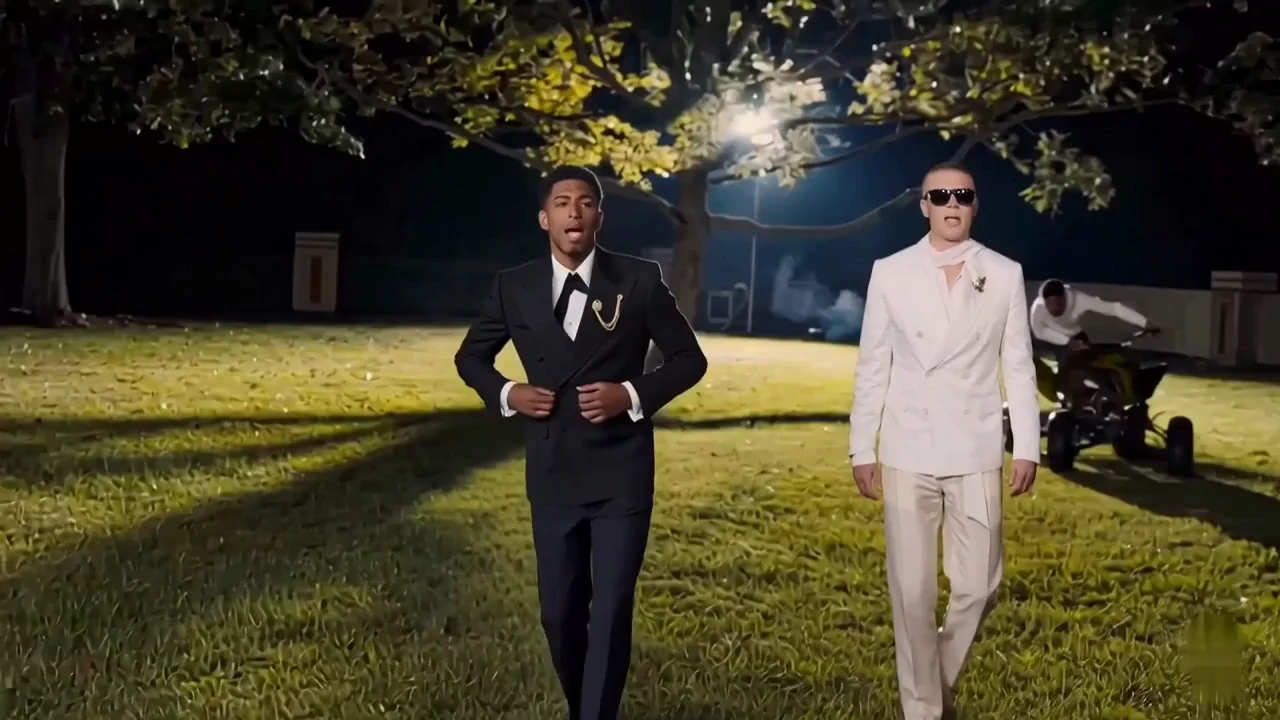
The Bandit AI rap duo trend—built on Juice WRLD and YoungBoy Never Broke Again’s 2019 hit "Bandit" and its Cole Bennett / Lyrical Lemonade music video—has taken over TikTok, Instagram Reels, and YouTube Shorts. In 15 seconds, two photos become a full 7-shot music video jumping from a nighttime spotlight lawn and glowing blue glass-block studio to ATV wheelies, dry grass, a concrete wall, and a blue-lit close-up.
Ready to try it right now? Open the Bandit — YB & Juice WRLD AI Rap Duo template or browse the full AI Rap Video collection.
Why Most Single-Pass AI Face Swaps Fail on Bandit
If you have tried making this trend with generic face-swap apps or single-prompt video tools, you have probably hit three classic failures:
- Original-actor leakage after hard cuts: When the video jumps from the nighttime lawn into the blue glass-block room or the solo lawn shot, single-pass models often revert the background performer back to the original actor.
- Blurry faces and melted outfits: Because the opening lawn shot is dark and backlit, low-resolution face swaps lose facial structure and smear suits or accessories.
- Off-beat rap lip-sync: Fast rap verses drift out of sync when the generator ignores frame-level mouth choreography.
AI4MEME solves all three with a per-shot anchor + Kling v3 Motion Control pipeline: every single camera cut generates its own dedicated 1K anchor frame directly from your two uploaded photos before transferring frame-accurate lip-sync, gestures, and camera motion—and keeps the iconic ATV wheelie cut untouched.
Step-by-Step: How to Make Your Bandit AI Video
- Open the template: Go to Bandit — YB & Juice WRLD in any mobile or desktop browser (no app install required).
- Upload Photo 1 (Lead rapper): This person takes the foreground lead role on the opening lawn, blue room, dry grass, concrete wall, and final blue close-up.
- Upload Photo 2 (Co-star): This person takes the supporting partner role across every dual shot plus the solo nighttime lawn shot.
- Generate & download: Click generate (
1,140 credits—covered by a single$9.99Starter pack or$5.99first-order welcome offer) and download a 100% watermark-free 720p MP4 with the normalized original beat.
Best Photo Tips for Sharp Likeness
- Use chest-up or waist-up solo photos: One clear person per photo works dramatically better than a distant full-body shot.
- Avoid glass reflections or heavy shadows: Clean, even lighting on the face gives the anchor generator crisp eyes, jawline, and hairstyle details.
- Pick distinctive outfits: Contrasting outfits (for example, a black tuxedo on the Lead rapper and a white suit on the Co-star) make the duo pop against both the nighttime lawn and the gray concrete wall.
3 Viral Ideas That Perform Best on TikTok & Reels
- Dream sports or celebrity crossovers: Cast two football stars, basketball rivals, or unexpected pop-culture icons together.
- Best-friend surprise drop: Turn you and your best friend into a 15-second rap duo and drop it straight into the group chat.
- Formal-wear contrast: Suits, graduation gowns, or wedding tuxedos rapping hard under the nighttime spotlight always earn instant replays.
Want more rap scenes? Check out BigXthaPlug — Give It All or explore the full AI Rap Video Generator hub.
2 photos · 1,140 credits
Bandit — YB & Juice WRLD
Turn two photos into the viral Bandit YB & Juice WRLD 7-shot AI rap duo video—nighttime lawn spotlight, blue studio, ATV cut, dry grass, concrete wall, and original beat.
More AI Meme & Video Guides
How to Make the BigXthaPlug — Give It All AI Rap Video from One Photo
Turn a single portrait into the viral BigXthaPlug Give It All studio mic AI rap video with exact lip-sync, warm orange stage lighting, and original sound.
How to Make Viral 2-Person and 3-Person AI Dance Videos with Friends
Compare the best multi-person AI dance templates—Wassup in a Minute, No Scrubs, Snowman Dance, and Jingle Bell—plus photo tips so every friend stays recognizable.
GTA 6 AI Prompt & Style Guide (2026): How to Turn Any Selfie Into Vice City Cover Art
Copy-pasteable GTA 6 AI prompt & GTA 6 image prompt recipes for Rockstar-style cover posters, GTA character filter portraits, and Vice City loading screens—or generate 2K results from one selfie in 20 seconds.