
Best AI Meme Video Generators from Photos in 2026: Viggle AI vs. MakeTrend vs. AI4MEME
A side-by-side comparison of the top AI photo-to-meme video makers in 2026—comparing 1–3 person group dances, watermarks, iPhone and Android browser support, and real per-video pricing.
If you want to turn your own selfies or photos of friends into a funny dancing or reaction video for TikTok, Instagram Reels, or a group chat, you now have two very different categories of tools to choose from:
- AI photo-to-video meme generators (AI4MEME, Viggle AI, MakeTrend AI, MemeToVideo, MemeClone) that animate still portraits into moving characters using ready-made motion templates.
- Traditional browser/mobile video editors (CapCut, Kapwing, Canva) where you manually add top-and-bottom text captions, music, or cuts to existing clips.
Below is the complete 2026 side-by-side comparison of the top AI meme video generators so you can pick the right workflow for 1-person selfies, 2-person duos, or 3-person friend group dances.
2026 AI Meme Video Generators Compared at a Glance
| Tool | Best For | Max People per Scene | Free Tier & Watermark Policy | Works in Mobile Browser (No App)? | Pricing & Subscription Requirement |
|---|---|---|---|---|---|
| AI4MEME | 1–3 person ready-made dance & story scenes with full-body outfit consistency | 1, 2, or 3 people (dedicated Left / Center / Right roles) | Free scene previews + 60 free trial credits for 2K GTA posters + 1 free AI character portrait; 100% watermark-free MP4 on all packs and plans | Yes — runs in Safari & Chrome on iPhone, Android, iPad, Mac & Windows | No subscription required: one-time packs from US$9.99 (1,550 permanent credits) or Lite US$9.99/mo (1,600 credits/mo; ~US$1.19 per 190-credit video) |
| Viggle AI | High-volume solo dancing character swaps | 1 person (up to 7 via Multi-Track) | Up to 5 free videos/day with watermark; paid plan needed to remove watermark | Browser tools available; heavily pushes iOS/Android app | Paid monthly subscription for watermark-free HD exports |
| MakeTrend AI | Recreating specific viral TikTok trends | 1 to 3 people | No free video tier; paid credits required | Yes (browser-based) | Credit packs per generation |
| MemeToVideo | Testing short free ad-supported clips | 1 to 3 photos | Free 4-second videos after watching ads (with watermark) | Yes (browser-based) | Paid credits from $0.99+ to remove watermarks and unlock longer clips |
| MemeClone | Quick single-selfie template swaps | 1 to 3 people | No free video tier | Yes (browser-based) | One-time credit packs starting at $9.99 |
| CapCut | Adding text captions & trending TikTok audio to existing clips | Manual timeline editing | Free basic templates; Pro features cost extra | Requires mobile app for full template experience | Freemium + CapCut Pro subscription |
Which AI Meme Video Generator Should You Choose?
1. Best for 2–3 Friends, Group Chats, and Watermark-Free MP4s: AI4MEME
Most photo-to-video tools struggle when you try to animate more than one person—either blending faces together or distorting clothing when dancers cross paths.
AI4MEME solves this in two ways:
- Dedicated 1-person, 2-person, and 3-person scene architecture: Every template in the scene catalog specifies its exact photo count upfront. Solo scenes like Infinity Pool, Vossi Bop, Burning Bridges, and Bby Wow take 1 photo; duo scenes like Snowman Dance and Zombie Love take 2 photos; trio dance routines like Jingle Bell Brazil Dance and No Scrubs map 3 separate friend photos to Left, Center, and Right dancers.
- Built-in Full-Body AI Character + Outfit Generator: Before rendering a multi-person dance, you can combine each friend's face photo with an optional reference outfit photo to generate a clean, full-body character portrait. Your first character portrait after sign-in is free, and it keeps every dancer's face and outfit sharp throughout the entire 15–16 second routine.
- Automatic Credit Refund Protection: If an upstream AI model ever times out or fails to complete a video, reserved credits are automatically refunded to your balance within seconds—you never lose money on a failed render.
See the 2–3 Friend Group Meme Video Guide or check current Black Friday 2026 bonus credit deals (up to +55% bonus credits on packs and +33% on plans).
2. Best for Viral TikTok Trend Clips & Watermarked Solo Experiments: Viggle AI, MakeTrend AI & MemeToVideo
If you want to compare alternatives for solo character swaps or ad-supported previews:
- Viggle AI offers a massive library of community motion clips and up to 5 free daily generations with a watermark. It is a strong starting point for quick solo character swaps if you are willing to install its mobile app.
- MakeTrend AI focuses on recreating specific viral TikTok trends in the browser using per-generation paid credit packs.
- MemeToVideo lets signed-in users generate short 4-second watermarked clips supported by ads before deciding whether to pay for clean exports.
3. Best for Traditional Text Captions and Final Polish: CapCut & Kapwing
If you already have a funny video clip (or just exported an MP4 from AI4MEME) and want to overlay a relatable POV text hook—such as "POV: The boss cancels the Monday meeting"—tools like CapCut and Kapwing are ideal for adding timed text captions without re-rendering the AI animation.
How to Get the Cleanest Result on Any Photo-to-Video Tool
Regardless of which generator you pick, follow these four rules for recognizable faces and smooth motion:
- Upload one person per slot: Never upload a crowded group photo into a single-person upload box. If you only have one group photo of your friends, crop each friend into a separate portrait first.
- Keep faces and hair unobstructed: Avoid dark sunglasses, heavy beauty filters, hands covering the chin, or cropped foreheads.
- Match the aspect ratio to where you post: Choose 9:16 vertical templates (such as BigXthaPlug - Give It All, GTA Diner Handover, Jingle Bell Brazil Dance, Snowman Dance, Infinity Pool, Bby Wow, and Zombie Love) for TikTok, Instagram Reels, and YouTube Shorts, or 16:9 / 4:3 (Next James Bond 007, GTA 5 Sunset Goodbye, Burning Bridges, Vossi Bop, Need for Speed AI, Wassup in a Minute, No Scrubs) for desktop and throwback music-video edits.
- Skip text prompts when choreography matters: Instead of guessing camera angles in text-to-video tools, use a step-by-step template workflow where the motion, lighting, and soundtrack are already locked in.
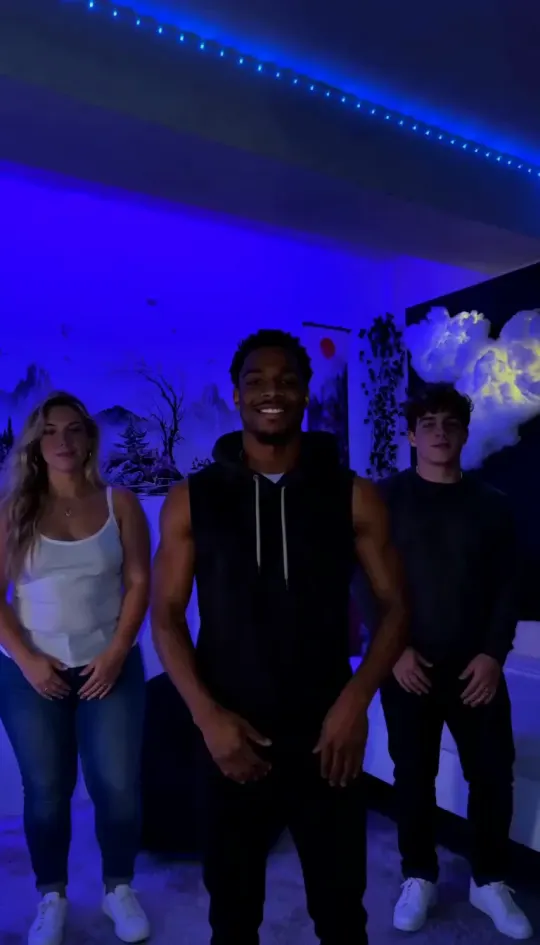
3 photos · 1,430 credits
Jingle Bell Brazil Dance
Put three people into a synchronized Brazil funk holiday hand-dance in a neon-blue room while keeping their faces, outfits, moves and original sound.
More AI Meme & Video Guides
How to Make the Bandit (YB & Juice WRLD) AI Rap Duo Video Trend
Step-by-step guide to creating the viral 7-shot Bandit YB & Juice WRLD AI rap duo video from two photos—with sharp face likeness, accurate lip-sync, and original audio.
How to Make the BigXthaPlug — Give It All AI Rap Video from One Photo
Turn a single portrait into the viral BigXthaPlug Give It All studio mic AI rap video with exact lip-sync, warm orange stage lighting, and original sound.
How to Make Viral 2-Person and 3-Person AI Dance Videos with Friends
Compare the best multi-person AI dance templates—Wassup in a Minute, No Scrubs, Snowman Dance, and Jingle Bell—plus photo tips so every friend stays recognizable.